Savings goals in Flowjar: Goal and Savings jars with a target
Set a target on a Flowjar Savings or Goal jar to track progress as N% there, keep that money out of Safe to spend, and estimate what to put in each month.
Short answer
In Flowjar, a savings goal is a jar of type Goal or Savings with a Target (optional) amount. The jar card then shows how much you have of the target and how far you are as N% there. Money in these jars is kept out of Safe to spend, so you can't spend it by accident. There are no deadline dates; to work out a monthly amount, use the Savings goal money tool.
A goal you can't see is easy to raid. Flowjar keeps your goals in the same place as your everyday money, shows their progress next to your bills and spending, and quietly takes them out of the number you check before buying something.
Goal jars and Savings jars
Flowjar has four jar types. Two of them are for money you want to keep:
| Type | In-app description | Kept out of Safe to spend? |
|---|---|---|
| Savings | Set aside and kept out of Safe to spend. | Yes |
| Goal | Saving toward something specific. Kept out of Safe to spend. | Yes |
| Bills | Covers rent, utilities and subscriptions. Bill payments come out of this jar. | No |
| Spending | Everyday money. Expenses come out of this jar. | No |
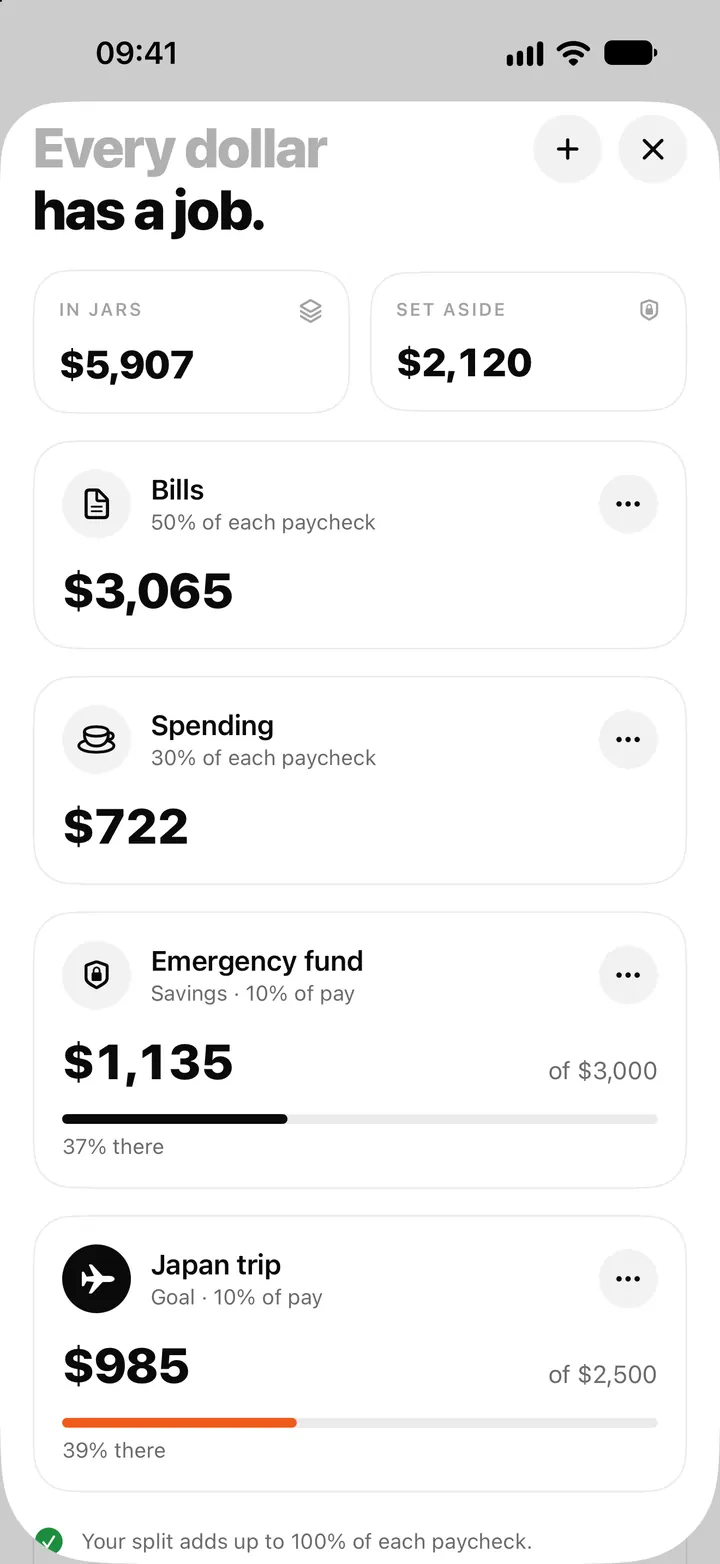
Both savings types behave the same in the math. The difference is how you think about them: a Savings jar suits money with no end date, like an emergency fund, while a Goal jar suits something specific, like a trip or a laptop. On the Jars screen a Goal jar gets a filled icon and a progress bar in your accent color, so it stands out.
You already have one of each. Finishing setup creates four jars, including one called Savings and one called Goals, with no target yet. The jars and paycheck split post covers how those four are set up.
Add a target
Any jar can have a target, but it's most useful on Savings and Goal jars.
Turn a jar into a goal
- Open Jars and tap ⋯ on the jar, then Edit jar (or tap + for a New jar).
- Give it a Jar name, such as Japan trip.
- Set Type to Goal or Savings.
- Pick an Icon that you'll recognise at a glance.
- Set Share of each paycheck if you want part of every paycheck to go here.
- Type the amount in Target (optional) and tap Save.
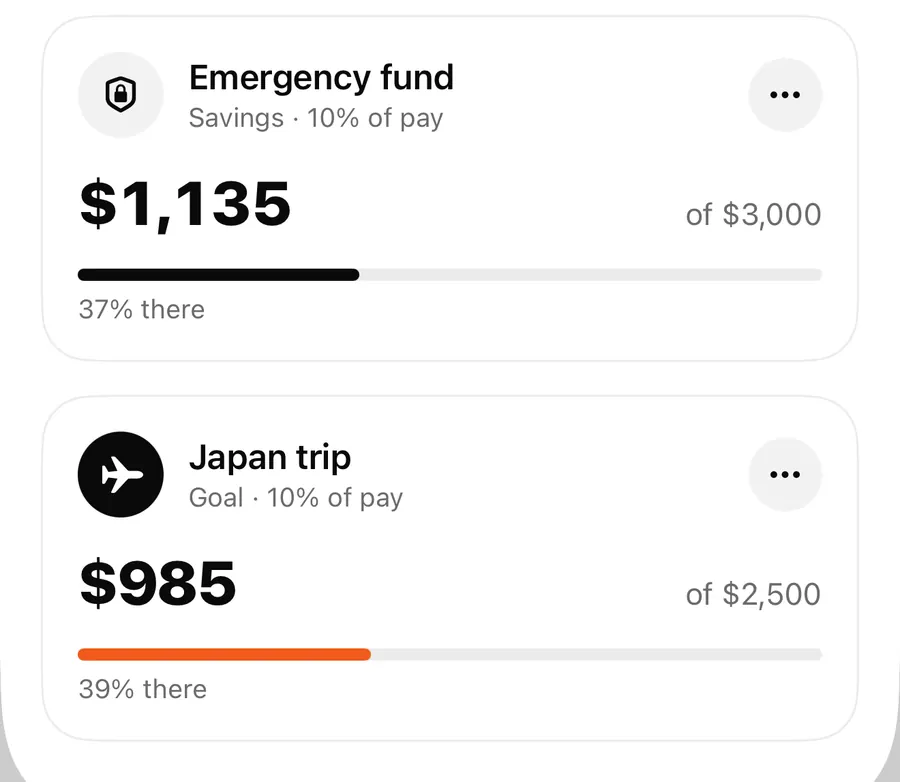
Once a target is set, the card shows the jar's amount, of the target, a progress bar and N% there. The progress tops out at 100% once you reach the target, even if you keep adding. Leave the target empty and the card simply shows the amount.
How money gets into a goal
There are two ways:
- From each paycheck. When you add income with Fill my jars on, Flowjar shares it across your jars by each jar's Share of each paycheck. A Goal jar with a 10% share gets 10% of every paycheck you log that way. Shares go up in 5% steps. The Fill my jars post walks through payday.
- By hand. Tap the jar, choose Add to jar and type an amount. This is handy for a one-off top-up from a bonus or a refund. See moving money between jars.
When you finally spend the money, add the expense and set Paid from jar to that goal jar. The jar goes down and the purchase still appears in Activity.
Why goals lower Safe to spend
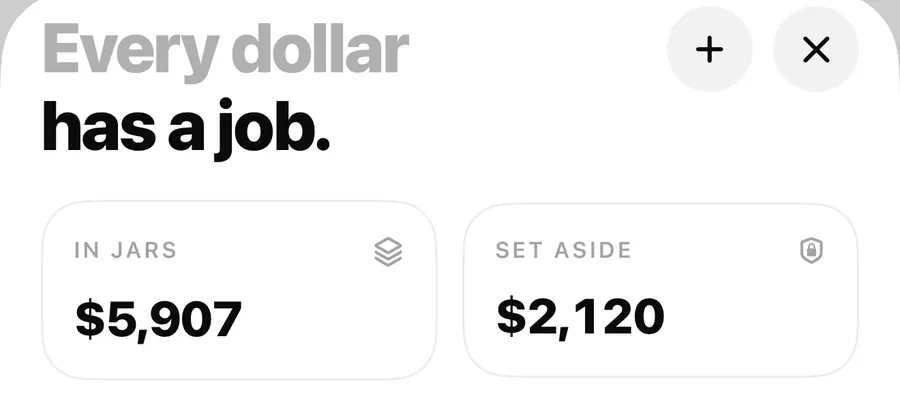
The Set aside tile on Today and on the Jars screen is the total held in your Savings and Goal jars. Safe to spend subtracts it before dividing the rest over the days until payday.
In the sample plan in the screenshots, the Emergency fund jar holds $1,135 and the Japan trip jar holds $985. Together that is the $2,120 shown as Set aside. That money is still in Alex's balance, but it isn't counted as free to spend. Moving $100 more into the trip jar would lower today's number; taking $100 out would raise it.
Working out a monthly amount
A jar target has no date attached, so Flowjar doesn't tell you how much to save each month. For that, open Money tools and choose Savings goal. It has two modes:
- Monthly amount: enter Goal amount, Already saved, an optional Interest rate and how long you want (Reach it in), and it estimates what to put away each month.
- Time to goal: enter what you can Save each month and it estimates how long it takes.
Then turn the answer into a jar share yourself. For example, if the tool says about $200 a month and you're paid about $2,000 once a month, a 10% share of each paycheck is close. The tool doesn't create or change a jar; the numbers are estimates, not a promise. The same calculator is on the website under money tools, and the savings goal guide explains the thinking behind it.
FAQ
Can I set a deadline for a goal?
Not on the jar. A target is just an amount. Use the Savings goal tool to estimate a monthly amount for a date, then set the jar's share to match.
What is the difference between a Savings jar and a Goal jar?
Both are kept out of Safe to spend and both can have a target. Goal jars are meant for something specific and get a filled icon and an accent-colored progress bar.
Does money in a goal jar count in my balance?
Yes. Your balance includes it, but Set aside subtracts it before Safe to spend is worked out.
What happens when I reach the target?
The card shows 100% there. Nothing moves automatically; you can raise the target, keep adding, or spend from the jar with Paid from jar.
Download Flowjar and give your next goal its own jar.
Keep reading
Money jars in Flowjar: split each paycheck into bills, spending and savings
Flowjar splits each paycheck across jars for bills, spending, savings and goals. Learn the four jar types, how shares work and what each does to Safe to spend.
Read
Move money between jars in Flowjar: Add to jar, Take out and Paid from jar
Move money in or out of a Flowjar jar, pick which jar an expense is paid from, and see what each move does to your balance, Set aside and Safe to spend.
ReadFlowjar money tools: 9 free loan, debt and savings calculators on iPhone
Flowjar includes nine free calculators for loans, mortgages, car loans, debt payoff, savings goals, compound interest, budget splits and shared trip costs.
ReadHow much should you save each month for a goal?
Calculate a monthly saving amount from your goal, deadline, current balance and assumptions about growth with Flowjar.
Read guide