Flowjar widgets and Live Activity: Safe to spend on your Lock Screen
Put today's Safe to spend amount on the Home Screen, Lock Screen and Dynamic Island with Flowjar's widget and Live Activity, plus Add and Scan buttons.
Short answer
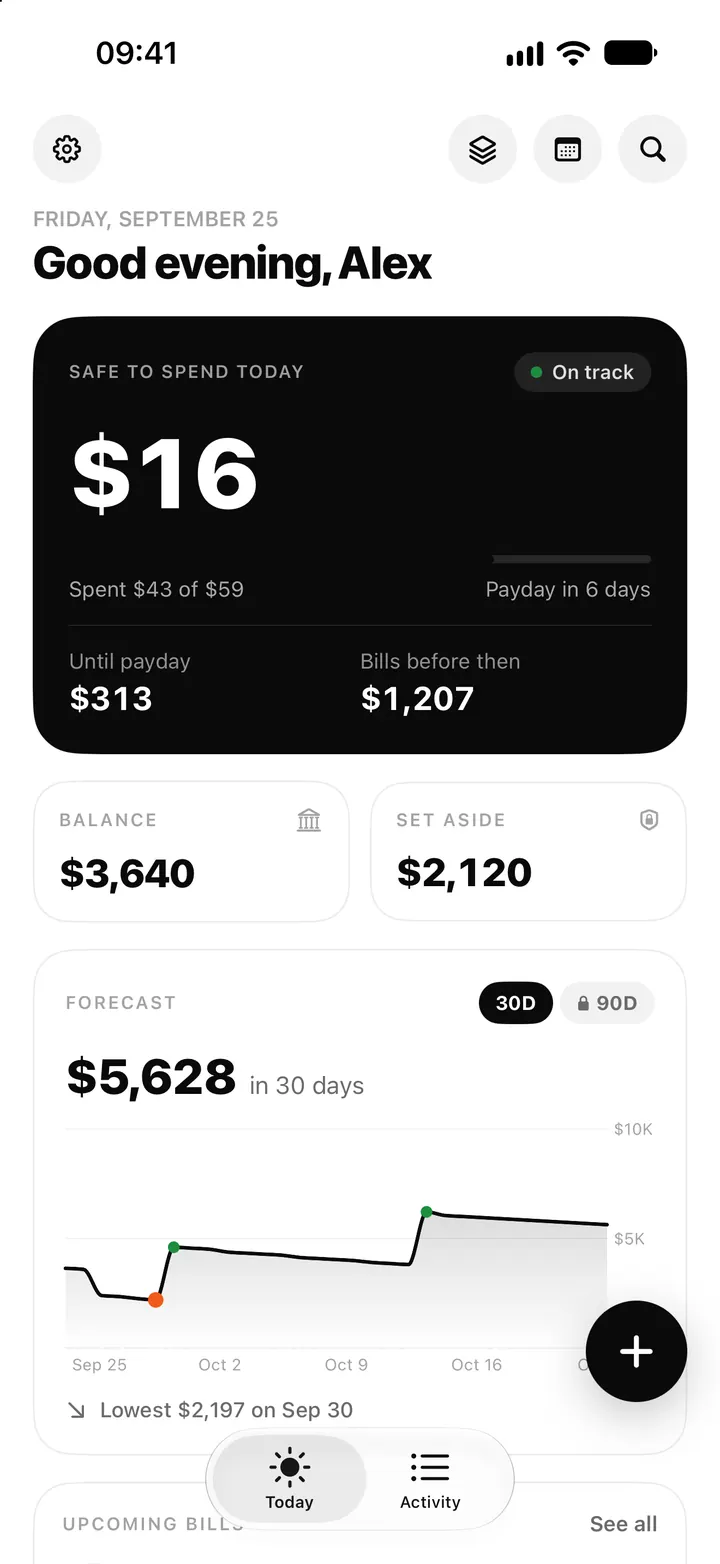
Flowjar has one widget, Safe to spend, in five sizes: small and medium for the Home Screen, and circular, rectangular and inline for the Lock Screen. It shows today's amount and rolls over to a new day at midnight. The medium widget adds Add and Scan buttons. An optional Live Activity keeps the same number on the Lock Screen and in the Dynamic Island; it is off until you turn it on.
The whole point of a daily number is to see it before you spend, not after. Opening an app every time is one tap too many, so Flowjar puts Safe to spend today where you already look: the Home Screen, the Lock Screen and the Dynamic Island. If you are new to the number itself, start with how Safe to spend works.
The Safe to spend widget, size by size
| Size | Where | What it shows | Tap it to |
|---|---|---|---|
| Small | Home Screen | Today's amount, a spent bar, and of $59 · 6 days left | Open Today |
| Medium | Home Screen | The small widget plus Add and Scan buttons | Open Today, quick add or the receipt camera |
| Circular | Lock Screen | A ring that empties as you spend, with the amount inside | Open quick add |
| Rectangular | Lock Screen | The amount and N days to payday | Open quick add |
| Inline | Lock Screen, above the clock | $16 safe today, or over today if you went past it | Open Flowjar |
The amount turns red when you are over today's amount. On the last day before payday the line changes to payday tomorrow.
Add the Safe to spend widget
- Touch and hold an empty part of your Home Screen or Lock Screen.
- Tap Edit, then Add Widget.
- Search for Flowjar and pick Safe to spend.
- Swipe to the size you want and tap Add Widget.
- Open Flowjar once so the widget has today's numbers.
It rolls over at midnight, even if you don't open the app
Flowjar saves a small snapshot of today's numbers whenever something changes: you add an entry, pay a bill or move money. The widget reads that snapshot and works out the next few days ahead of time, dividing what is free until payday over the days left. So tomorrow morning the widget already shows tomorrow's amount, with nothing spent yet, before you open the app.
Messages instead of a number
Sometimes the widget shows a short message instead of an amount:
- Locked, or App Lock is on. Open Flowjar to see today's amount. You have turned on Lock with Face ID, so the widget hides your amounts.
- Split your paycheck, or It's payday. Open Flowjar to split your paycheck. Payday has arrived. Flowjar never logs the paycheck for you, so add it as income and the number comes back. See Fill my jars on payday.
- Set up your plan: you haven't finished setup yet.
Add and Scan from the medium widget
The medium widget has two buttons next to the number. Add opens the quick add box, where you type something like coffee 4.50. Scan opens the receipt camera so Flowjar can read the total for you. Both open the app; nothing is added until you confirm it. More on scanning in receipt scan.
The Live Activity: Lock Screen and Dynamic Island
The Live Activity is a live card on the Lock Screen that shows today's amount, a spent bar and a line like of $59 today · 6 days to payday, with an Add button. On iPhones with a Dynamic Island, the amount sits next to the island. Touch and hold it to expand it: you see the payday date and Add expense and Scan buttons.
Turn it on in Settings under On your iPhone > Live Activity. Flowjar may also show a one-time card on Today, Keep today's amount in view, with a Turn on button. If the switch is greyed out, Live Activities are turned off for Flowjar in the iPhone's own settings.
Two things to know:
- iOS ends a Live Activity after about 8 hours. Flowjar starts it again the next time you open the app.
- At midnight the numbers are out of date, so the card asks you to open Flowjar to refresh today's amount instead of showing yesterday's.
FAQ
Why does my widget say Locked?
Lock with Face ID is on in Settings > Privacy, so the widget and Live Activity hide amounts. Open Flowjar to see today's number.
Why did my Live Activity disappear?
iOS ends Live Activities after about 8 hours, and you can also swipe one away. Open Flowjar and it starts again, as long as the setting is on.
Can I add an expense from the widget without opening the app?
No. Add and Scan open Flowjar on the quick add box or the camera. Siri's Log an expense is the way to add one without opening the app.
Does the widget show my balance?
No. It shows today's Safe to spend amount and how much of the daily amount you have used. Your balance stays inside the app.
Download Flowjar and keep today's number on your Lock Screen.
Keep reading
Safe to spend today on iPhone: how Flowjar works out your daily number
Flowjar takes your balance, sets aside savings and bills due before payday, and splits the rest over the days left. Here is how the Safe to spend number works.
ReadFlowjar with Siri, Shortcuts and Control Center: log spending hands-free
Ask Siri to log an expense without opening Flowjar, check what is safe to spend, and put Quick add or Scan receipt in Control Center or on the Action button.
ReadScan a receipt in Flowjar: the total is read on your iPhone
Flowjar reads a receipt's total, shop name and recent date with on-device text recognition, fills in the expense for you to check, and doesn't save the photo.
ReadWhat belongs in a two-minute budget check?
Use a two-minute Flowjar budget checklist to review your balance, bills, income, jars and forecast before spending.
Read guide